


Microphone Amplifier
4.3373.00 Reviews
App Specs
- Version
- 13.1.0
- Updated On
- License
- Free
- Downloads
- 10,000,000+
- Developer
- DOSA Apps
- Categories
- Medical
- Platform
- Android
Screenshots
 Analysis by AppCompare
I judge a microphone amplifier less by how loud it can make a sound and more by how quickly I can get useful audio without turning a simple task into a setup project. Microphone Amplifier is aimed at that practical gap: using a phone’s microphone, or a headset microphone, to make nearby sound easier to hear. It is a straightforward idea, but the results depend on the room, the phone, and what you connect for listening.
What “quick” really means with a sound amplifier
For a one-off need, the appeal is that a phone is already in your pocket. I can see this being faster than searching for a dedicated amplification device when I want to hear a nearby speaker more clearly or need a temporary boost in a small room. The app’s simple purpose also makes it easier to understand than a full audio-editing tool: it is about listening to live sound, not recording and polishing it afterward.
That convenience should not be confused with instant, guaranteed clarity. Amplification raises the microphone’s pickup along with the sound you want, so a quiet voice in a calm room is a more promising case than a distant voice surrounded by traffic or several conversations. I would start at a modest level and raise it gradually. Turning things up all at once can make unwanted room noise more noticeable, even if the overall output is louder.
When the room gets busy
A useful everyday test is a family meal in a room where several people are talking. If I am seated near the person I want to hear, placing the phone closer to that person can matter more than pushing the volume higher. That small change improves the signal the microphone receives before amplification begins. It is a better first move than expecting software to separate one voice perfectly from a crowd.
The same thinking applies to a meeting or a talk: put the phone in a stable spot with a clear path toward the speaker, then listen from a comfortable position. If the phone is too close to a speaker or pointed toward other noise, the result may be less useful. For longer conversations, I would also plan where the phone can sit without being handled constantly; movement and rubbing near a microphone can distract from the sound you are trying to follow.
One trade-off with a live amplifier is that the microphone and playback device are part of the same setup. A nearby loudspeaker can send amplified sound back into the microphone and create an unpleasant feedback loop. I would keep the listening speaker away from the phone and begin with a low output level, especially in a small room. Headphones can avoid that speaker-to-microphone path, although the listening arrangement that feels comfortable will depend on the person and device.
Who is likely to find it useful
This kind of tool makes most sense for occasional, short listening situations: following a quiet conversation, hearing a speaker across a modest room, or trying a simple temporary setup before carrying separate audio equipment. It may also suit someone who wants to experiment with a phone and headset microphone rather than buy a dedicated amplifier straight away. The important distinction is that it is a convenience aid, not a substitute for a properly fitted hearing device or professional advice about ongoing hearing difficulty.
Worth Reading Before You Choose

Baby Panda World Brings Quick Play to Modern Phones, but Its Game Library Feels Busy

ESPN’s Live Game View Makes Following Close Games Easier

QuizzLand Review: A Good Fit for Short Trivia Breaks, Not Every Player

Basketball Stars: Multiplayer Is Fast, but Can It Recover When Matches Go Wrong?

WEBTOON Turns Phone Updates Into a Better Reading Routine

Link to Windows Runs on Shared Habits, Not Social Feeds
I would skip it as a primary solution if I needed dependable amplification all day, precise control in a public-address setup, or clear speech from far away in a noisy place. A dedicated assistive listening device is designed around sustained personal listening, while a microphone amplifier app relies on the phone’s hardware and the listening environment. For a presentation to a group, a proper microphone and speaker system will generally be the more predictable choice. The app is better treated as a handy backup than as a replacement for purpose-built equipment.
Practical limits before relying on it
Before an important use, I would try the exact phone, headset, and speaker combination in the same kind of room. Check that the sound is comfortable, that speech is understandable rather than merely louder, and that the setup does not produce feedback. A short rehearsal also answers the basic question of whether the microphone is picking up the intended person from where the phone will sit. This is more useful than testing only at arm’s length in a quiet room and assuming the result will carry over elsewhere.
Battery use is another sensible consideration when audio is being processed and played continuously. I would not count on a phone used for amplification to remain available for other tasks all day, particularly if it is also driving an external speaker. For a brief conversation, that may be irrelevant; for an extended event, keeping the phone charged and minimizing other use is a prudent habit. I would also keep the phone accessible so I can lower the output quickly if the sound becomes uncomfortable.
People often wonder whether an app like this will make every sound clearer. In practice, amplification and clarity are not the same thing: if the original voice is masked by noise, making the whole input louder may not solve the problem. Another common question is whether it can replace hearing aids. I would not treat it that way; it is a temporary listening tool, and persistent difficulty hearing deserves a conversation with a qualified health professional. If the goal is to address hearing loss throughout daily life, purpose-built support is the safer choice.
Microphone Amplifier is a medical-category app from DOSA Apps, and its role is easy to grasp without a complicated learning curve. It is free to download, rated for Everyone, and has an average rating of 4.3 from around 59,000 ratings, with over 10 million installs. The current version is 13.1.0, and it supports Android 5.0 and later. Optional in-app purchases range from $0.99 to $99.99 per item, so I would check the purchase details before choosing anything paid.
Getting Started with Microphone Amplifier
First things first, downloading and installing Microphone Amplifier is a breeze. Available for both Android and iOS, you just hop onto your app store of choice, search for it, and hit download. Within moments, you're ready to roll. The installation process is straightforward, and the app itself doesn't hog much space on your device.
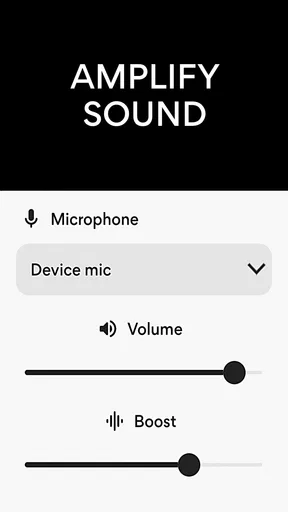
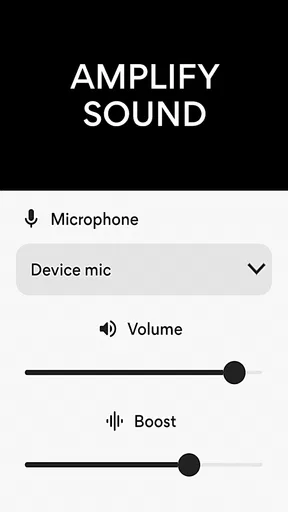
Once you've got it up and running, the interface greets you with a clean and intuitive design. It's not cluttered with unnecessary bells and whistles, which I appreciate. The main screen features a simple volume slider and an on/off button—perfect if you’re someone who values ease of use.
Features That Stand Out
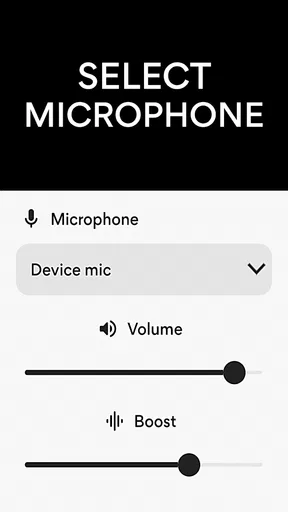
Now, let’s dive into what makes this app a must-have. The standout feature, no doubt, is its ability to turn your smartphone into a makeshift microphone. This is ideal for presentations, announcements, or even just trying to get your friends' attention in a noisy room. The app uses your phone's mic to pick up sound and then amplifies it through your device's speakers or connected Bluetooth speakers.
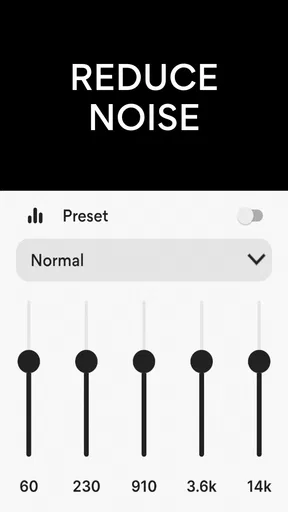
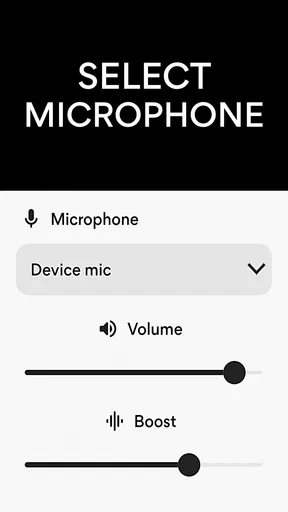
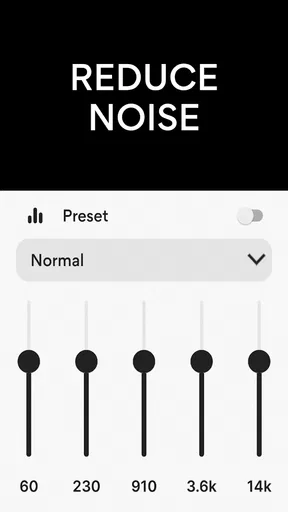
One of the nifty features is the adjustable gain control. You can tweak the input sensitivity to suit different environments, ensuring that your voice is loud and clear without any distortion. Plus, there's a noise reduction option that helps minimize background noise, which is a lifesaver in busy settings.
Another cool aspect is the equalizer settings. You can customize the sound output to your liking, adjusting bass, treble, and midrange frequencies. This level of control allows you to fine-tune the audio to fit specific needs, whether you're speaking, singing, or just playing music.
Real-World Application
I've tested Microphone Amplifier in several scenarios. During a small outdoor gathering, I connected my phone to a portable Bluetooth speaker, and it worked like a charm. My voice was loud and clear, cutting through the chatter effortlessly. The app’s noise reduction was particularly effective, eliminating wind noise and background chatter.
In a more quiet setting, like a classroom, I used it to amplify my voice during a presentation. Here, the gain control came in handy, allowing me to adjust the volume perfectly without feedback issues. It’s these little touches that make the app versatile for various situations.
Some Things to Keep in Mind
While Microphone Amplifier is a fantastic tool, it’s not without its quirks. For one, it heavily relies on the quality of your phone’s microphone and speakers. If your device’s hardware isn’t up to par, you might not get the best results. Additionally, using the app for prolonged periods can drain your battery quickly, so it's wise to keep an eye on your phone’s power level.
Another thing I noticed is that, in extremely noisy environments, the app can struggle to filter out all background noise completely. It’s not a dealbreaker, but something to be aware of if you're planning to use it in a bustling setting.
Making it dependable for a real occasion
My preferred approach is to set up the listening path before anyone is waiting on me. I would place the phone near the sound source, check that its microphone is not covered, and test the listening output at a comfortable level. Then I would listen for a few seconds with the room as it will actually be used. That quick check catches problems like a blocked mic, an awkward phone position, or output that is too loud far sooner than adjusting things in the middle of a conversation.
If the setup sounds harsh, I would change one thing at a time rather than moving every control. First reposition the phone; then reduce gain if background noise is prominent; only after that would I use tone adjustments to make speech easier for me to follow. This is a useful trade-off to remember: equalizer changes can shape the sound, but they cannot restore details the microphone never captured. A better position often does more than further processing.
For a quiet appointment or a conversation at home, a headset microphone may be worth trying if the phone’s built-in microphone is not in a convenient place. It can let the pickup point sit closer to the person speaking, while the phone stays where it is easy to control. I would still test for comfort and any cable or connection complications beforehand, since the best arrangement is the one that stays put without getting in the way.
Choosing between an app and dedicated gear
Compared with simply raising a phone’s media volume, an amplifier app has a different job: it works with sound picked up through a microphone, rather than making an existing recording louder. Compared with a dedicated hearing amplifier, the phone approach is more flexible for a quick experiment and avoids carrying another device, but it also makes the result more dependent on phone placement, battery, and nearby playback. For a group presentation, a separate microphone and speaker are usually easier to position for the audience; for personal listening, headphones or a purpose-built assistive device may be less awkward.
That makes the app most appealing when the need is occasional and the environment is manageable. A student trying to hear a quiet discussion in a small study group, for instance, can put the phone closer to the speaker and listen privately. Someone hoping to amplify a speaker from the back of a large room is asking much more of a phone microphone, and I would not rely on it for that. Distance and competing voices remain real constraints, even when the output is turned up.
What I would expect over time
For perceived speed, I would expect the simple controls to make a brief setup feel approachable, but I would not judge performance by loudness alone. The useful question is whether the sound arrives clearly enough to follow without distracting hiss, distortion, or feedback. A quiet room and a nearby source give the app a fairer test than a crowded public space. If clarity is poor, I would stop and adjust the placement rather than keep increasing amplification.
For stability during a longer session, the main practical concerns are the same ones that affect any phone-based live audio setup: battery, physical placement, and maintaining a comfortable listening level. I would keep the phone on a steady surface, avoid covering its microphone, and make sure it is not pressed against something that could transmit handling noise. If audio becomes uncomfortable or the app stops giving useful speech, lowering the level or ending the session is better than trying to force a marginal setup to work.
I also would not assume that a change of phone or headset will behave identically. A different microphone can pick up sound differently, and a Bluetooth speaker’s location can change how prone the room is to feedback. When switching equipment, repeat the short sound check rather than carrying over a setting that worked elsewhere. That small bit of preparation is especially valuable before a class, gathering, or conversation where pausing to troubleshoot would be inconvenient.
Final Thoughts
Overall, Microphone Amplifier is a solid app that does exactly what it promises. It’s user-friendly, effective, and packed with features that make it adaptable to various needs. Whether you’re using it for professional purposes or just for fun, it’s a handy tool to have on your smartphone.
If you find yourself frequently needing to amplify sound, give Microphone Amplifier a try. It might just become one of those essential apps you didn’t know you needed until you had it. So, head over to your app store, download it, and start amplifying your world!
Pros
- Easy-to-use interface for quick adjustments.
- Boosts microphone volume significantly.
- Customizable settings for personalized use.
- Compatible with most Android devices.
- Enhances audio for clearer recordings.
Cons
- May introduce background noise at high levels.
- Limited features in the free version.
- Requires Android 5.0 or higher.
- Ads can be intrusive during use.
- No built-in equalizer for audio tuning.
FAQs for Microphone Amplifier
What is Microphone Amplifier and how does it work?
Microphone Amplifier is an app designed to enhance the sound captured by your device's microphone. It works by boosting the audio levels, making it ideal for recording in low-volume environments or when clarity is needed. The app processes sound in real-time, providing a clear and amplified output.
Is Microphone Amplifier compatible with all devices?
Microphone Amplifier is compatible with most Android and iOS devices. However, performance may vary depending on the device's hardware capabilities. It’s recommended to check the app’s requirements and user reviews related to your particular device model to ensure optimal functionality.
Does Microphone Amplifier require internet access to function?
No, Microphone Amplifier does not require an internet connection to boost your microphone's audio. It operates offline, processing audio directly on your device. However, an internet connection might be necessary for initial download and accessing any in-app support or updates.
Are there any privacy concerns with using Microphone Amplifier?
Microphone Amplifier only uses your microphone while the app is active, and it doesn’t store or transmit audio data unless specified by the user. Always review the app's privacy policy and permissions to ensure your data is handled securely and to your satisfaction.
Can Microphone Amplifier damage my device’s microphone?
Microphone Amplifier is designed to safely enhance microphone audio without causing damage to your device. However, excessive amplification settings might lead to audio distortion or feedback. It’s advised to adjust settings gradually to find a balance that suits your needs without straining your microphone.


